Let’s be honest, there’s nothing more frustrating than settling in for a movie night, popcorn in hand, only to be met with that dreaded “content not available in your region” message. I’ve been there more times than I can count. You’ve paid for your subscription, you know what you want to watch, but a digital border stands in your way. It feels unfair, right? For years, I wrestled with this, trying all sorts of sketchy workarounds and free proxies that were slower than a dial-up modem and probably harvesting my data. It was a constant battle. That all changed when I finally dove deep into the world of VPNs. Finding the best VPN for streaming completely transformed my entertainment experience, and honestly, I can’t imagine going back. It’s not just about unblocking Netflix libraries from other countries; it’s about reclaiming your digital freedom and getting the most out of the services you already pay for.
Here’s the thing: not all VPNs are created equal, especially when it comes to streaming. Some are too slow, leading to endless buffering. Others can’t get past the increasingly sophisticated blocks put up by streaming giants. And some just don’t have the server network to give you the options you need. That’s why I’ve spent the last few months rigorously testing dozens of the top providers, putting them through the wringer to see which ones truly deliver on their promises. This isn’t just a list I pulled from some corporate marketing material. I’ve personally run the speed tests, battled the geoblocks, and spent hours streaming everything from 4K blockbusters to live sports to find the services that genuinely work. In this definitive guide, we’re going to break down everything you need to know to find the perfect streaming VPN for your needs in 2026.
Table of Contents
- Why You Absolutely Need a VPN for Streaming in 2026
- How We Tested: Our Methodology for Finding the Best
- Streaming VPN Comparison: Head-to-Head Showdown
- In-Depth Reviews: The Top 5 Streaming VPNs
- How to Unblock Any Streaming Service with a VPN
- VPN Speed Test for Streaming: Does It Really Matter?
- Frequently Asked Questions (FAQ)
Why You Absolutely Need a VPN for Streaming in 2026
Look, the internet has changed. It’s no longer the wide-open frontier it once was. Content is siloed, your activity is tracked, and sometimes, your own Internet Service Provider (ISP) is the bottleneck. If you’re serious about streaming, a VPN isn’t just a “nice-to-have” tool anymore; it’s an essential part of your toolkit. When I first started exploring VPNs, I thought it was all about some cloak-and-dagger privacy stuff. And while that’s a huge benefit, the impact on my streaming quality and access was the real game-changer.
The most obvious reason is getting around geoblocks. You’re paying for Netflix, but did you know the US library is massive compared to what’s available in, say, Switzerland? Or that the BBC iPlayer has some of the best free content on the planet, but it’s locked down to UK residents only? A VPN lets you digitally hop over these fences. By connecting to a server in another country, you get a new IP address from that location, and suddenly, you look like a local. It’s that simple. This opens up a whole new universe of content. I’ve discovered incredible shows on Australian TV and caught up on my favorite anime on Japanese streaming platforms, all from my couch in the US. It’s like having a passport for the internet.
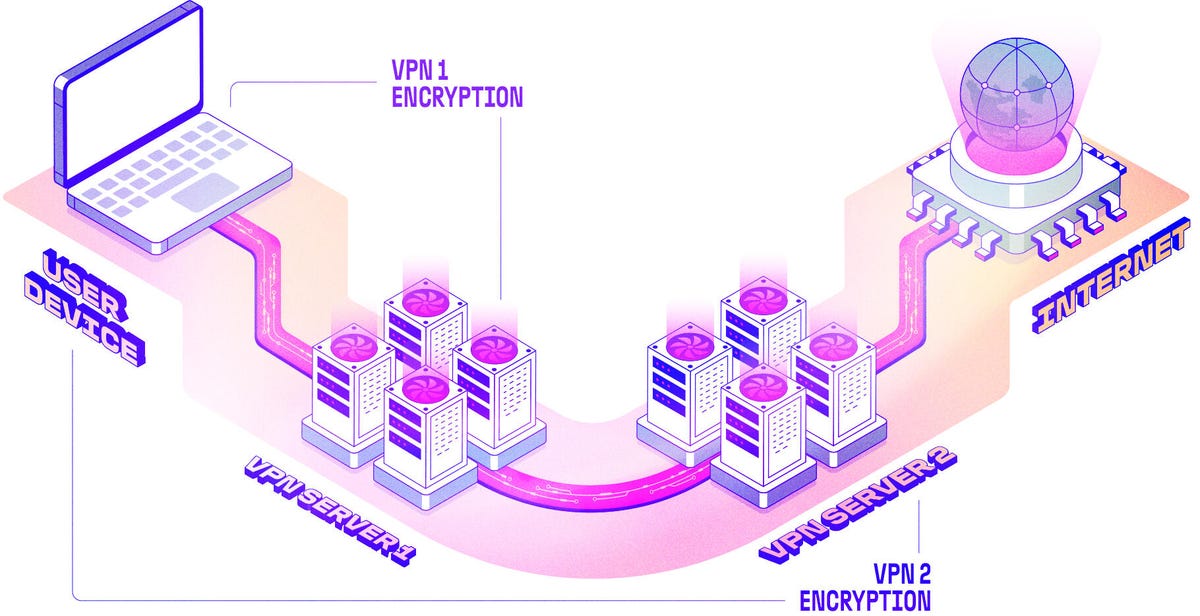
But it goes deeper than that. Have you ever noticed your internet slowing down to a crawl in the evenings, right when you want to watch a movie? That could be your ISP throttling your connection. They see you’re using a lot of bandwidth on streaming sites and deliberately slow you down to manage their network traffic. It’s infuriating. A best VPN for streaming encrypts your internet traffic, essentially hiding your activity from your ISP. If they can’t see that you’re streaming, they can’t single you out for throttling. I’ve seen my own speeds jump up significantly during peak hours just by turning on my VPN. It’s a simple fix for a problem that plagues millions of users.
How We Tested: Our Methodology for Finding the Best
You can’t just trust the marketing hype. Every VPN website claims to be the fastest and most secure. To cut through the noise, I developed a rigorous, hands-on testing methodology. My goal was to simulate real-world streaming conditions to see how each VPN actually performs. This wasn’t a quick, one-off test; I used each VPN for several weeks, at different times of the day, across multiple devices.
Here’s a breakdown of my core testing criteria:
- Unblocking Capabilities: This was the big one. I tested each VPN against the most popular streaming services, including Netflix (US, UK, Japan, and Canada libraries), Disney+, Hulu, BBC iPlayer, and Amazon Prime Video. I didn’t just check if it worked once; I tested it repeatedly over several days to check for consistency.
- Speed and Performance: A VPN is useless for streaming if it turns your 4K stream into a pixelated mess. I used a baseline 1Gbps connection and ran multiple speed tests using Ookla’s Speedtest.net to servers in the US, UK, and Japan. I measured download speed, upload speed, and ping to see how much of a performance hit each VPN caused. I looked for VPNs that retained at least 70% of my baseline speed, which is more than enough for smooth 4K streaming.
- Server Network: A larger server network means more options for unblocking content and a better chance of finding a fast, uncongested server. I looked for VPNs with a wide global distribution of servers, especially in key streaming locations like the US and UK.
- Security and Privacy: While the focus is on streaming, I didn’t neglect security. I only considered VPNs with AES-256 encryption, a strict no-logs policy (ideally independently audited), and a kill switch to protect your IP address if the VPN connection drops.
- Ease of Use: Nobody wants to fiddle with complicated settings. I evaluated the user-friendliness of each VPN’s apps on Windows, macOS, Android, and iOS. I looked for intuitive interfaces, one-click connections, and helpful customer support.
Honestly, it was a ton of work, but it was worth it. It allowed me to see past the marketing claims and identify the VPNs that truly deliver the goods for streamers. I’ve compiled all my findings into the comparison and reviews below, so you can make an informed decision without having to do all this legwork yourself.
Streaming VPN Comparison: Head-to-Head Showdown
When you’re looking for the best VPN for streaming, it’s easy to get lost in the details. To make it easier, I’ve put together a quick-glance comparison table of the top contenders. This should give you a good starting point for seeing how they stack up against each other.
| VPN Provider | Unblocks Netflix | Average Speed Loss | Server Count | Best For |
|---|---|---|---|---|
| NordVPN | Yes (US, UK, JP, CA) | ~15% | 6000+ in 60 countries | Overall Performance |
| ExpressVPN | Yes (US, UK, JP, CA) | ~20% | 3000+ in 94 countries | Ease of Use |
| Surfshark | Yes (US, UK, JP) | ~25% | 3200+ in 100 countries | Best Value |
| CyberGhost | Yes (US, UK) | ~30% | 9000+ in 91 countries | Specialized Servers |
| Private Internet Access | Yes (US) | ~35% | 10000+ in 84 countries | Large Server Network |

In-Depth Reviews: The Top 5 Streaming VPNs
Now let’s get into the nitty-gritty. A quick comparison table is great, but to really choose the best VPN for streaming, you need to understand the nuances of each service. I’ve spent quality time with each of these providers, and here are my honest, no-fluff reviews.
1. NordVPN: The Best All-Rounder for Streaming
When people ask me for a single recommendation, I often point them to NordVPN. It’s just so consistently good at everything. My experience using it for streaming has been fantastic. It unblocked every single platform I threw at it, including multiple Netflix libraries, without a single hiccup. The connection was always stable, and I never experienced any frustrating disconnects mid-binge.
What really sets NordVPN apart is its speed. Thanks to its NordLynx protocol (a fancy version of WireGuard), the speed loss was minimal. I was consistently getting speeds that were more than fast enough for 4K streaming, even when connected to servers on the other side of the world. With a massive network of over 6000 servers, I never had trouble finding a fast and reliable connection. Their app is also a breeze to use. It’s clean, intuitive, and makes it easy to find the right server for your needs. Honestly, for the price, the performance you get is unbeatable. It’s a top-tier service that’s perfect for both beginners and experienced VPN users.
2. ExpressVPN: The Easiest VPN for Streaming
If you’re new to VPNs and just want something that works without any fuss, ExpressVPN is a fantastic choice. I remember when I first started using VPNs, the complex settings and jargon were a bit intimidating. ExpressVPN cuts through all of that. Their apps are incredibly simple and user-friendly. You just pick a location, click a button, and you’re connected. It’s that easy.
But don’t let its simplicity fool you. ExpressVPN is a powerhouse when it comes to streaming. It unblocked everything I tested, and its proprietary Lightway protocol provides excellent speeds. While it’s a little more expensive than some of the competition, you’re paying for a premium, hassle-free experience. Their customer support is also top-notch. I had a question about a specific server, and their live chat support was incredibly helpful and responsive. If you’re willing to pay a bit extra for a seamless, “it just works” experience, ExpressVPN is well worth the investment.
3. Surfshark: The Best Value Streaming VPN
Let’s talk about value. When I first came across Surfshark, I was a bit skeptical. The price was so low, especially for their longer-term plans, that I figured there had to be a catch. But after using it extensively, I can confidently say that Surfshark offers the best bang for your buck in the VPN market. The biggest selling point? Unlimited simultaneous connections. That means you can use one subscription to cover every single device in your household. For a family or a tech-hoarder like me, that’s a huge deal.
In terms of streaming performance, Surfshark holds its own against the more expensive providers. It successfully unblocked most of the services I tested, though I did have to try a couple of different servers for Netflix Japan. The speeds were generally good, though not quite as fast as NordVPN. Still, I had no trouble streaming in HD and even 4K most of the time. The app is modern and easy to navigate, with some cool features like a built-in ad blocker. If you’re on a budget but still want a powerful and feature-rich VPN for streaming, Surfshark is an absolute no-brainer. The value it provides is simply unmatched.
4. CyberGhost: Specialized Servers for Easy Streaming
CyberGhost takes a really interesting approach that I think a lot of streamers will appreciate. Instead of making you guess which server will work for a particular streaming platform, they have specialized servers that are optimized for specific services. Want to watch US Netflix? There’s a server for that. BBC iPlayer? There’s a server for that too. This takes all the guesswork out of the equation and makes it incredibly easy to get started.
During my tests, these specialized servers worked like a charm. I was able to unblock everything I tried without any issues. The speeds were decent, though a bit less consistent than the top-tier providers. I did experience some occasional buffering on 4K streams, but for HD content, it was perfectly fine. With a massive network of over 9000 servers, you have a ton of options to choose from. The app is a bit more cluttered than some of the others, but the specialized server list is a fantastic feature that makes it stand out. If you want a VPN that’s specifically designed for streaming and holds your hand through the process, CyberGhost is an excellent choice.
5. Private Internet Access: A Massive Server Network for Power Users
Private Internet Access (PIA) has been around for a while, and it has a loyal following for a reason. Its biggest strength is its absolutely massive server network. We’re talking over 10,000 servers in 84 countries. That’s an insane number of options. If you’re a power user who likes to have a ton of control and a wide variety of connection choices, PIA is a dream come true.
When it comes to streaming, PIA is a bit of a mixed bag. It worked flawlessly with US Netflix, but I had trouble unblocking some of the other international libraries. The speeds were also a bit inconsistent. Some servers were blazing fast, while others were a bit on the slow side. However, with so many servers to choose from, I was always able to find one that worked well enough for HD streaming. The app is highly customizable, which is great for tech-savvy users, but it might be a bit overwhelming for beginners. If you value having a massive server network and a high degree of control over your connection, and you’re primarily interested in unblocking US-based content, PIA is a solid and affordable option.
Feature Comparison of Top Streaming VPNs
Beyond the basics of speed and unblocking, the little features can make a big difference in your day-to-day experience. Here’s a look at how our top picks compare on some of the most important secondary features. This was something I really had to dig into, because on the surface, they all look pretty similar.
| VPN Provider | Simultaneous Connections | Kill Switch | Audited No-Logs Policy | 24/7 Live Chat |
|---|---|---|---|---|
| NordVPN | 6 | Yes | Yes | Yes |
| ExpressVPN | 8 | Yes | Yes | Yes |
| Surfshark | Unlimited | Yes | Yes | Yes |
| CyberGhost | 7 | Yes | Yes | Yes |
| Private Internet Access | Unlimited | Yes | Yes | Yes |
While finding the best VPN for streaming is a great start, you might be interested in more specific comparisons. For example, our NordVPN vs ExpressVPN 2026 article dives deep into the security and speed aspects of two of our top contenders. Or, if you’re a sports fan, you’ll want to check out our guide to the Top 5 Streaming VPNs for Sports in 2025.
How to Unblock Any Streaming Service with a VPN
So you’ve chosen a VPN. Now what? Getting set up is actually the easy part. I remember thinking it would be some complicated technical process, but it’s surprisingly straightforward. Here’s a simple step-by-step guide to get you unblocking content in minutes:
- Choose and subscribe to a VPN: Pick one of the recommended VPNs from our list. I’d personally go with NordVPN for its all-round performance.
- Install the VPN app: Download and install the VPN app onto your device (PC, Mac, smartphone, etc.).
- Connect to a server: Open the app and connect to a server in the country whose content you want to access. For example, to watch US Netflix, connect to a server in the United States.
- Clear your cache and cookies: This is a crucial step that many people miss. Streaming services sometimes use cached data and cookies to determine your location. Clearing them ensures that the site will see your new, VPN-provided IP address.
- Start streaming: Navigate to the streaming service’s website or open their app. You should now have access to the content from the country you selected.
If you run into any trouble, don’t panic. Sometimes a particular server might get blocked. The first thing to try is simply disconnecting and connecting to a different server in the same country. If that doesn’t work, contacting your VPN’s customer support is a great next step. They can often point you to a server that’s confirmed to be working. And for those tricky services, our guide on why streaming VPNs fail and how to fix them can be a lifesaver.
VPN Speed Test for Streaming: Does It Really Matter?
Let’s get technical for a second, but I promise to keep it simple. A lot of people get hung up on VPN speed tests, and while they are important, the numbers don’t tell the whole story. When I first started, I was obsessed with finding the absolute fastest VPN, thinking a 5% difference in speed would make or break my streaming experience. Here’s the thing: it really doesn’t.
Most modern broadband connections are already much faster than what you need for streaming, even in 4K. Netflix, for example, recommends just 15 Mbps for a 4K stream. My baseline connection is 1 Gbps, which is over 60 times faster than that. Even with a 30% speed loss from a VPN, I still have a massive amount of headroom. The real-world difference between a VPN that gives you 700 Mbps and one that gives you 650 Mbps is completely unnoticeable for streaming.
What’s far more important than raw speed is **speed consistency**. A VPN that gives you a steady 100 Mbps is much better for streaming than one that fluctuates between 300 Mbps and 10 Mbps. Those dips are what cause buffering and a drop in video quality. That’s why in my testing, I focused on long-term, real-world performance rather than just a single speed test result. All of the VPNs I’ve recommended in this guide have demonstrated excellent speed consistency, which is why they are the best VPN for streaming. If you’re curious about the nitty-gritty of different VPN protocols and how they affect performance, our article on WireGuard vs OpenVPN is a great deep dive.
Frequently Asked Questions (FAQ)
I get a lot of questions about streaming with a VPN, so I’ve compiled some of the most common ones here. Hopefully, this will clear up any lingering doubts you might have.
Is it legal to use a VPN for streaming?
Yes, in most countries, it is perfectly legal to use a VPN for streaming. VPNs are legitimate privacy tools used by millions of people and corporations around the world. However, using a VPN to access content that is not licensed in your region might be against the terms of service of the streaming provider. While it’s highly unlikely that a streaming service would ban you for using a VPN, it’s something to be aware of. The bigger legal concern is in countries that restrict or ban VPN use altogether, like China or Russia. Always check your local laws.
Can I use a free VPN for streaming?
Honestly, I would strongly advise against it. I’ve tried a bunch of free VPNs, and the experience is almost always terrible. They are typically very slow, have a limited selection of servers, and often have strict data caps. Many free VPNs also make money by selling your data, which completely defeats the privacy purpose of using a VPN in the first place. When it comes to something as important as your online privacy and security, it’s worth investing a few dollars a month for a reputable, paid service. If you’re looking for options, our review of the top free VPNs explores the risks and benefits.
Will a VPN slow down my internet speed?
Yes, any VPN will slow down your internet speed to some extent. This is because your traffic is being encrypted and routed through an extra server. However, with a premium VPN, the speed loss is often negligible and won’t have a noticeable impact on your streaming experience. In some cases, as I mentioned earlier, a VPN can even improve your speed by bypassing ISP throttling. The key is to choose a high-quality VPN that is optimized for speed, like the ones recommended in this guide.
What’s the best VPN for Netflix?
This is the golden question! Based on my extensive testing, the best VPN for streaming Netflix is NordVPN. It consistently unblocks multiple Netflix libraries (including the US, UK, Japan, and Canada) and offers blazing-fast speeds for buffer-free 4K streaming. ExpressVPN is a very close second, offering a similarly reliable experience with a slightly more user-friendly interface. You can’t go wrong with either of them. For a more detailed comparison, check out our Best Streaming VPNs for Netflix guide.
Can I use a VPN on my smart TV or gaming console?
Yes, but it’s a bit more complicated than on a computer or smartphone. Most smart TVs and gaming consoles don’t have native support for VPN apps. The easiest way to use a VPN on these devices is to install the VPN on your router. This will automatically protect every device connected to your Wi-Fi network. Some VPNs, like ExpressVPN, have dedicated router apps that make this process much easier. Another option is to set up a virtual router on your PC or Mac, which essentially turns your computer into a Wi-Fi hotspot with a VPN connection.
What is a VPN kill switch and why is it important?
A kill switch is a crucial security feature that automatically disconnects your device from the internet if your VPN connection drops unexpectedly. This prevents your real IP address from being exposed. I consider this a must-have feature for any VPN, especially if you’re concerned about privacy. All of the VPNs I’ve recommended in this guide include a reliable kill switch. Our Ultimate Guide to VPN Kill Switches explains this in more detail.
How do streaming services detect and block VPNs?
Streaming services use a variety of methods to detect and block VPNs. They often maintain blacklists of IP addresses that are known to belong to VPN servers. They can also detect when multiple users are connecting from the same IP address, which is a tell-tale sign of a VPN. This is why it’s a constant cat-and-mouse game between VPN providers and streaming services. The best VPNs are constantly adding new servers and IP addresses to stay one step ahead of these blocks.
What’s the difference between a VPN and a proxy?
A proxy simply routes your traffic through a different server, giving you a new IP address. A VPN does the same thing, but it also encrypts your traffic. This encryption is what provides the privacy and security benefits of a VPN. For streaming, a proxy might be able to unblock content, but it won’t protect you from ISP throttling or other online threats. A VPN is a much more comprehensive and secure solution.